
Go High Level Login: Where to Sign In (and What to Do When It’s Not Working)
Go High Level Login: Where to Sign In (and What to Do When It’s Not Working)
If you’re trying to log into Go High Level and running into issues, it’s usually not the platform.
It’s usually one of three things:
wrong login page
wrong email
or confusion between account types
Once you understand how HighLevel handles logins, most of these problems are easy to fix.
Start Here: The Main Go High Level Login
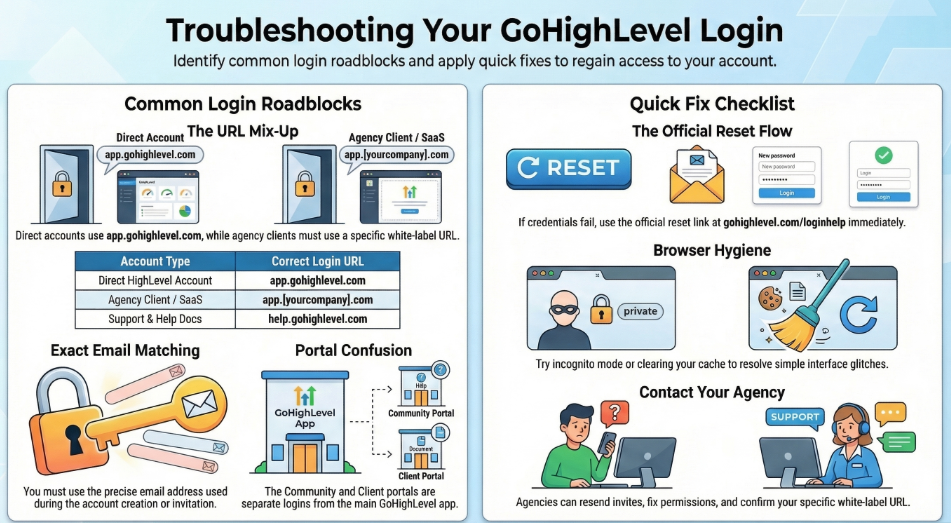
The default login is:
That’s the correct place for most users.
But not all.
If your account was set up by an agency, you might be using a white label login, which looks like:
👉 https://app.yourcompany.com
Same system. Different login URL.
If you use the wrong one, it can look like your account doesn’t exist—or your login isn’t working—even when it is.
Why Go High Level Login Trips People Up
Go High Level isn’t one single login experience.
There are a few different ways accounts are created:
direct HighLevel accounts
agency accounts
client subaccounts
white label SaaS setups
So two users on the same platform can have completely different login URLs.
That’s where most confusion starts.

Common Go High Level Login Issues
These are the ones that come up the most.
Wrong login page
If you were given a custom login by an agency, you need to use that—not the default HighLevel login.
Wrong email
You must use the exact email that was used to:
create the account
or accept the invite
Even small differences matter.
Password not working
Don’t guess—just reset it.
Official help here:
👉 https://www.gohighlevel.com/loginhelp
Community / portal login confusion
This is where a lot of people get stuck.
The community or client portal login is separate from your main Go High Level app login.
For example, if you're accessing a portal/dashboard like this:
👉 https://help.gohighlevel.com/support/solutions/articles/155000001205-client-portal-dashboard
That login experience can be tied to:
a specific subaccount
a client portal
or a custom setup
It may not use the exact same login flow as the main app.
Best practice:
use the same email tied to your account
if it doesn’t work, reset your password
don’t assume your community login = your app login
Browser issues
This one’s simple but common.
Try:
incognito mode
another browser
clearing cache
It fixes more login problems than you’d expect.

What to Do If You Still Can’t Log In
If you’re stuck, don’t overcomplicate it. Go step by step.
1. Confirm the correct login URL
Are you supposed to use:
app.gohighlevel.com
ora white label login like app.yourcompany.com
If you’re not sure, ask whoever gave you access.
2. Reset your password
Use the official reset flow:
👉 https://www.gohighlevel.com/loginhelp
3. Use the correct email
Make sure it matches exactly what was used when the account was created or invited.
4. Check official support
If something still isn’t right:
👉 https://help.gohighlevel.com/support/home
5. Contact your agency
If your account came through an agency, they’re your fastest fix.
They can:
resend your invite
fix permissions
confirm your login URL
get you back in quickly

The Real Issue Behind Login Problems
Login issues by themselves aren’t a big deal.
But if you’re running an agency, they add up fast.
A client can’t log in
→ they message you
A team member loses access
→ work pauses
Permissions are wrong
→ things break
Now someone has to stop what they’re doing and fix it.
And that happens over and over.
That’s where it becomes an operations problem—not just a login issue.
Where Most Agencies Get Stuck
It’s not the platform.
It’s everything around it.
onboarding
account setup
login support
client questions
ongoing requests
None of these are hard individually.
But together, they create drag.
And that’s what slows agencies down.
A Simpler Way to Handle It
If your team is constantly dealing with:
login issues
onboarding
support requests
account fixes
then the problem isn’t Go High Level.
It’s capacity.
That’s where Tikix fits in.
Tikix handles the backend work inside Go High Level:
onboarding
account support
A2P registration
work orders
client questions
implementation
So instead of your team getting pulled into small issues all day, it gets handled in the background.

Bottom Line
If you’re trying to log into Go High Level:
Start here:
👉 https://app.gohighlevel.com
Or use your agency’s login:
👉 app.yourcompany.com
If it’s not working:
use the correct email
reset your password
check the right login page
and contact your agency if needed
Most of the time, it’s something simple.
But if it keeps happening, it’s usually a sign your backend support needs to be stronger.
That’s the difference between just using Go High Level…
…and actually running smoothly on it.